Prisma PDV · phone-based register for small retail
I designed a mobile point of sale for neighborhood shops, from scanning items to closing the till. In the test app, I modeled how an active sale should keep using local data and when limit warnings could appear.
During a sale, the cashier needs to see what was added and what to charge
The design starts from the hypothesis of a neighborhood shop running its till on a phone. The cashier needs to check the cart between scans and handle catalog items and one-off items. I used that task to decide where to place the scanner, total and warnings that could interrupt work.
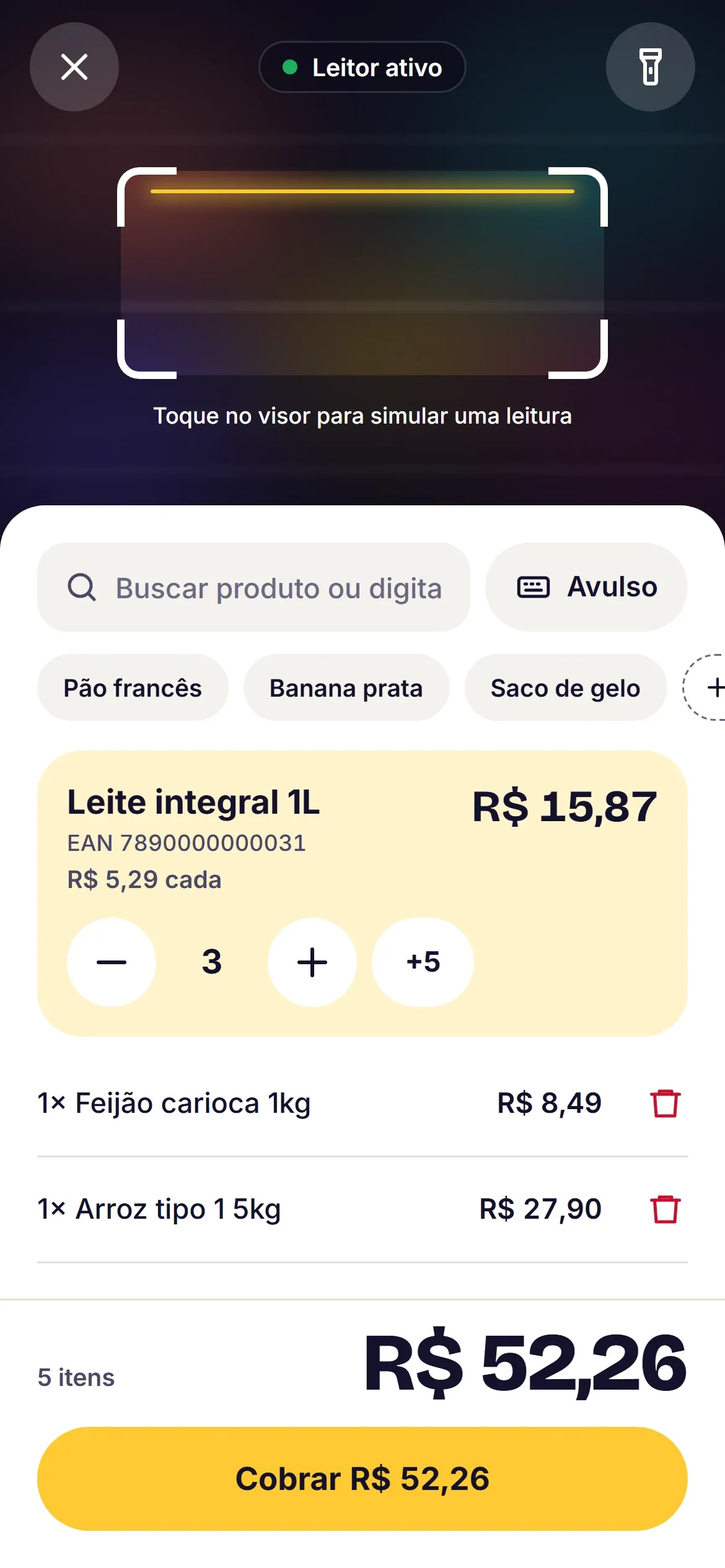
The scanner, cart and amount due stay on one screen
I put the scanner above the cart and kept the total on the payment action. Between scans, the cashier can see which item was added, its quantity and the updated total.
For items without a barcode, I designed paths for search, one-off items and goods sold by weight. Those cases stay in the same flow through checkout. The capture shows the design with fictional products and values.
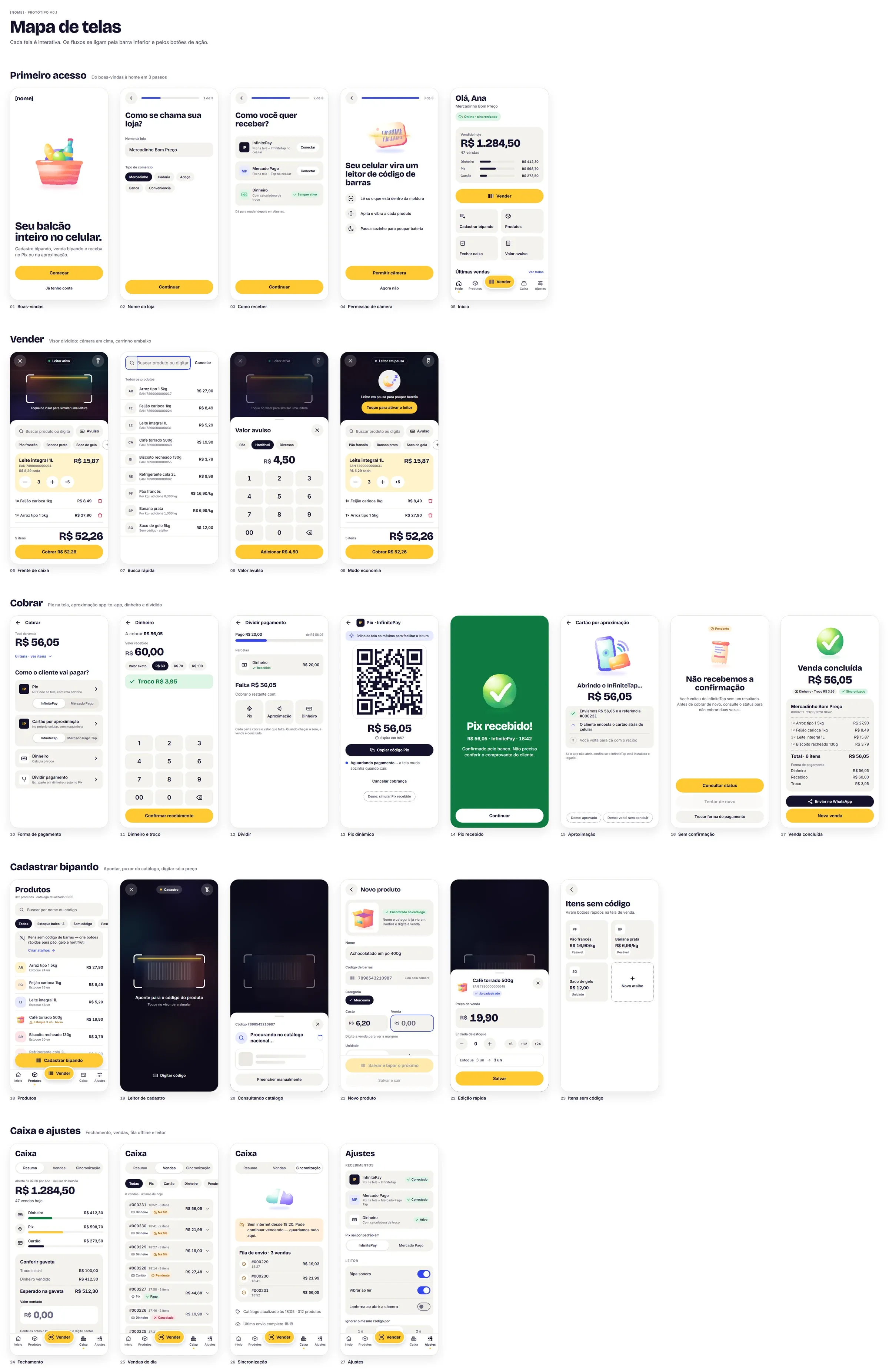
Charge, split and take Pix without leaving the flow.
Checkout offers Pix, card by tap on the phone, cash and split payment. With cash, the app suggests banknotes and works out the change. Split suggests half, shows progress (“Paid R$ x of R$ y”) and charges the rest in parts, each in its own method.
Pix by the shopkeeper's key and cash do not depend on any provider; Pix with automatic confirmation and tap need a connected provider, and there is a dedicated screen for when a payment is not confirmed.
Limit warnings stay outside an active sale
Rule no. 1 in the product document is never to interrupt a sale, because locking the register in the middle of the day destroys trust. Capacity limits (devices, operators, shops, catalogue and history) and management limits never act on a sale in progress: anyone reaching a limit sees a warning outside the sales flow and keeps selling, and nothing is deleted or blocked in the middle of a sale.
Each device keeps its own data, and a sale does not wait for the network. After a long time without syncing, the app asks for a connection before opening a new sale, never in the middle of one.
A catalogue with a deadline
When registering products, reading the barcode with the camera works without a network, and recognising the product only speeds things up. If the lookup takes too long or there is no network, the form opens with the code filled in. The name is an editable suggestion, and the price never comes from outside.
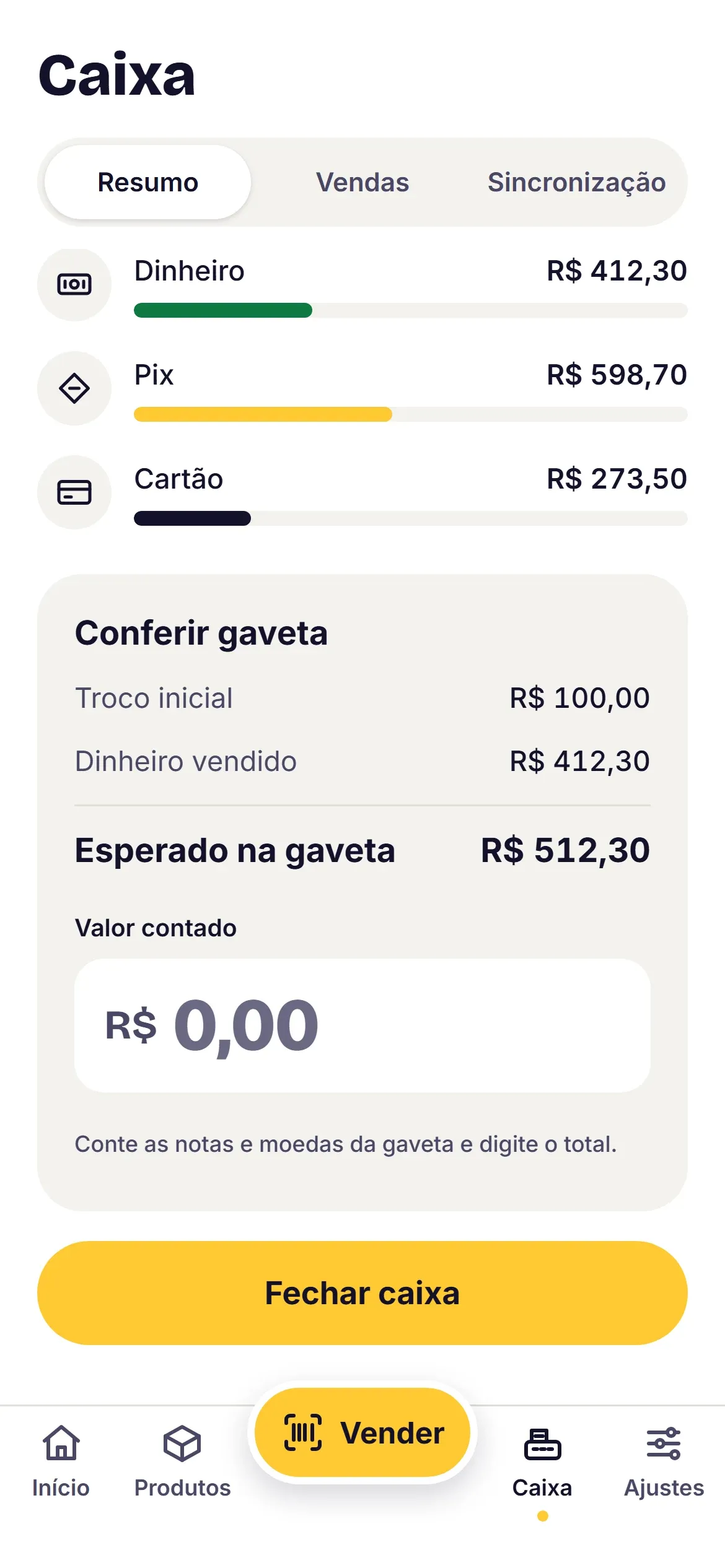
Closing compares the drawer with what should be in it.
The register opens with the starting change and accepts cash drops and top-ups, with an optional reason. On closing, the app works out what should be in the drawer (starting change, plus cash sales and top-ups, minus drops) and compares it with the counted amount.
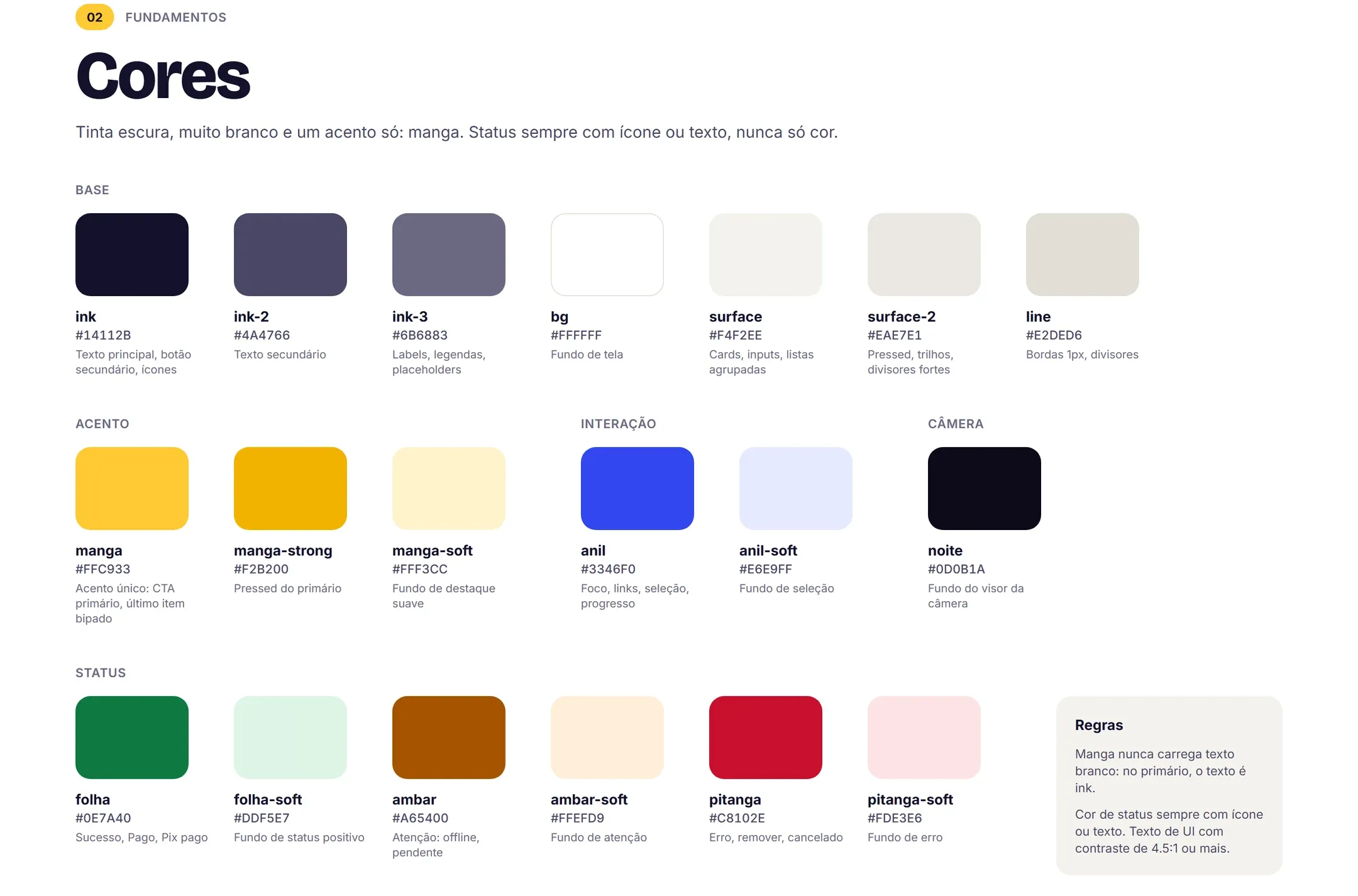
The result is “Spot on”, “Over R$ x” or “Short R$ x”, always with an icon and text, never colour alone.
Balcão: one accent and sentences that are verbs.
The Balcão design system has a single accent, mango yellow, never with white text; dark ink on white, pill buttons 56 px tall, a minimum touch target of 48 px and status always with an icon or text.
The voice is direct, in short sentences and action verbs: “Scan”, “Charge R$ 56.05”. Visible focus, text that scales up to 200% and respect for reduced motion are part of the system.
What changed
The screen map and test APKs document checkout and till-closing flows. Keeping an active sale moving is a product rule demonstrated with local data and simulated payments. Usability at the counter, real payments and operational impact still require a pilot.
- 27
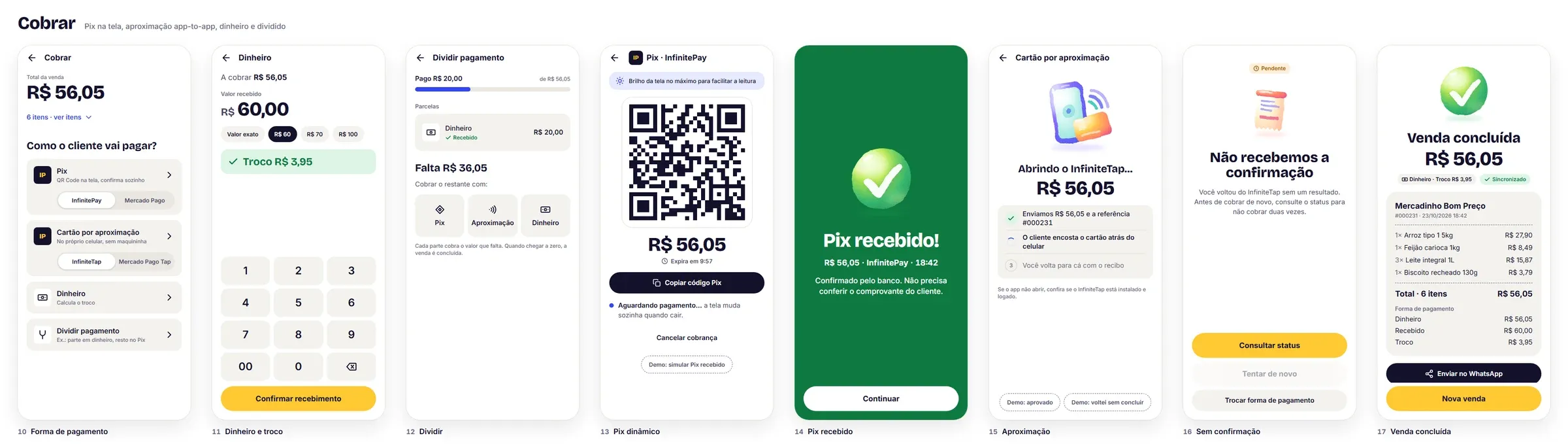
interactive screens in the prototype: first run, sell, charge, register by scanning, register and settings
Evidence: Deliverable - Offline first
each device keeps its own data, and a sale does not wait for the network
Evidence: System rule - Warnings outside the sale
prototype rule for surfacing capacity limits outside an active sale
Evidence: System rule
Sources and limits
Nothing here was measured. The numbers describe the project's deliverables and rules: the 27 screens come from the prototype's screen map, and the flow and state rules come from the product documents.
The product has no name yet: the app's wordmark is the placeholder “[nome]”, and Prisma PDV is the project's name in this portfolio. The shop, the operator and the figures on the screens (Mercadinho Bom Preço, Ana) are fictional data. The providers InfinitePay and Mercado Pago appear only as monograms, with no logos. The images on this page are presentation compositions made from the prototype and the test app.
The starting point is a product hypothesis: there is no pilot in a real shop, no documented research with shopkeepers and no Play Store release. The app exists only as test APKs and has not been used in a real shop yet.
Payments are simulated, and so are the Pix and tap providers. The test app keeps everything on the device and does not yet send sales to the server, and the paid product source is not connected.
The criteria in the documents are targets, not results: the catalogue has not been measured against them yet (recognition of real products and lookup time). The limit rules apply to the test build, are marked for review before launch and, like the catalogue criteria, are hypotheses.
Accessibility has not been audited.
The next step is to take the app to a few neighbourhood shops and watch selling at the counter, before defending any rule or target. Then connect the sales send queue, integrate a real payment provider, measure the catalogue on a sample of real products, audit accessibility and only then publish and measure results.
How to read the level of evidence
- Evidence: System rule
- A guarantee of the project, checkable in the code or in the documented decision.
- Evidence: Deliverable
- Something that exists and was delivered. It describes the work, not an outcome.
Appendix: details and process
Decision details
- No camera
- Without a camera, as in the browser, you can type the code.
- Cascading lookup
- The lookup goes through our own catalogue and a public product database, with a paid source as a fallback. A name only becomes the default suggestion once more than one shop has confirmed it.
- What is implemented
- The sync API and our own catalogue are implemented and tested.
- Sales list
- The sales list filters by period and exports CSV.
- Illustration and reading the amount
- The illustrations follow a watercolour recipe with soft volume, no outline and a white background. For screen readers, amounts are read out in full (“34 reais and 90 centavos”).
- Limits in one catalogue
- The screens, the product documents and the architecture come from the same line of reasoning, and the limit rules live in a single catalogue in the code, which the interface uses instead of repeating limits.
- Scope
- Electronic invoicing was left out of the first scope.
Process
- Flow principle
- I started from the principle that a sale in progress is never interrupted. Out of that came the limit rules and the app's warning and error states.
- Design system and prototype
- I defined Balcão (tokens, components, voice and illustrations) and built a prototype with 27 interactive screens and consistent fictional data (a shop called Mercadinho Bom Preço, the operator Ana).
- Product rules and architecture
- I wrote down, in documents, the rules the screens have to respect: the app's limits and states, the barcode catalogue and an offline-first architecture, with a domain package shared between the app and the API.
- Test app and API
- I followed the construction of the test app and its API. The app has tools for testers (test cards, simulated scans, simulated payments) and a diagnostic that copies the device's events, with no card data and with documents and emails masked.
- The scanner smoke-test rule
- The first APK shipped with a build optimisation that broke reading: the camera opened but nothing was read. Since the next version, every Android build is only released after scanning a product on a real device.
Updated .
Hiring a Senior Product Designer or DesignOps Lead?
I am available immediately, 100% remote. Let's talk about how I can help your product.